ACCESS resources for healthcare organizationsPatient signup ↗
ACCESS
RESOURCE CENTER
Get Started

WAYS TO CONNECT PATIENTS

Invite patients by text.
Introduce them during a visit.
HealthyConnect handles enrollment.

Choose either approach or use both. Your team makes the introduction; HealthyConnect follows up with interested patients and helps them get started.

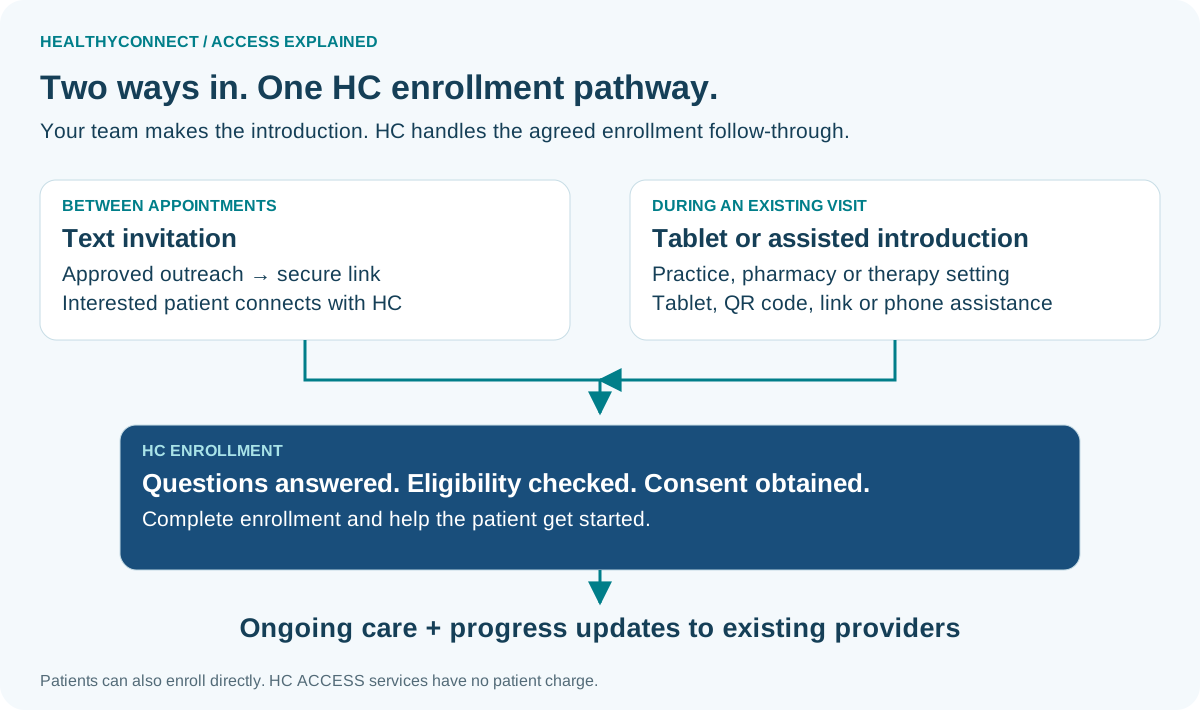
The patient connection at a glance.

Text invitations and in-person tablet or assisted introductions converge on HealthyConnect eligibility, consent and enrollment, followed by ongoing care.
Select to open the full-size infographic.
01 · INVITE BY TEXT

A familiar introduction.
A direct connection to HealthyConnect.

Use an agreed invitation from your organization or an authorized HealthyConnect sender. Patients can follow a secure link or request help.

SAMPLE INVITATION · FOR PARTNER APPROVAL

“[Practice name] is introducing HealthyConnect: ongoing support between visits, with no charge for HealthyConnect ACCESS care. You keep your providers. Interested? Use our secure enrollment link or contact HealthyConnect for help. HealthyConnect will confirm eligibility.”

HealthyConnect and your team confirm the sender, authorized audience, secure link, contact details and opt-out wording before sending.

Your teamApproves the invitation and outreach population.
02 · INTRODUCE DURING A VISIT

A brief conversation.
A supported handoff.

Introduce HealthyConnect during an existing practice, pharmacy or therapy visit. Offer a tablet, QR code, secure link or assisted phone connection.

SUGGESTED STAFF INTRODUCTION

“HealthyConnect provides ongoing support between visits at no charge for its ACCESS care. You keep your providers. Would you like HealthyConnect to contact you?”

Your staff can make the introduction. HealthyConnect on-site staffing can be discussed and arranged separately.

Your teamIntroduces the service and connects interested patients with HealthyConnect.
Patients can also come directly to HealthyConnect.

No outside referral is required. HealthyConnect confirms eligibility and helps the patient enroll. HealthyConnect ACCESS care is free to the patient; patients keep their existing providers.

Patient signup at MyHealthyConnect.ai ↗

Choose what fits your patient relationships.

Use text to reach patients between appointments; introduce HealthyConnect during visits when staff already have the patient’s attention.

DecisionText invitationDuring a visit
Best fitReach patients between appointments.Introduce HealthyConnect during a trusted, existing interaction.
Your team’s actionApprove the audience and invitation.Give a brief explanation and offer a connection.
HealthyConnect follow-throughRespond to interest, help with enrollment and begin care.Receive the handoff, help with enrollment and begin care.

Use both when helpful. A visit can introduce HealthyConnect; a follow-up invitation gives the patient a way to connect later.

CMS guidance on direct enrollment and patient costs ↗

One handoff. HealthyConnect completes enrollment.

Introduce

Your team shares the invitation or helps the patient connect. Patients may also come directly to HealthyConnect.

Enroll

HealthyConnect confirms eligibility, obtains consent and helps the patient get started.

Connect the care

Agree where updates go, who reviews them and how HealthyConnect and your team coordinate follow-up.

See eligible patients and the ACCESS tracks ↗

START WITH ONE PAGE

Choose the introduction.
HealthyConnect coordinates the setup.

No fee to become a HealthyConnect referral partner. Tell us your contact, preferred connection method and where clinical updates should go.